
Building Ubiquiti Media Content System for Digital Signage
Built to support flexible content creation and management for enterprise users, enabling them to create, organize, and deliver media across physical business spaces.
Overview
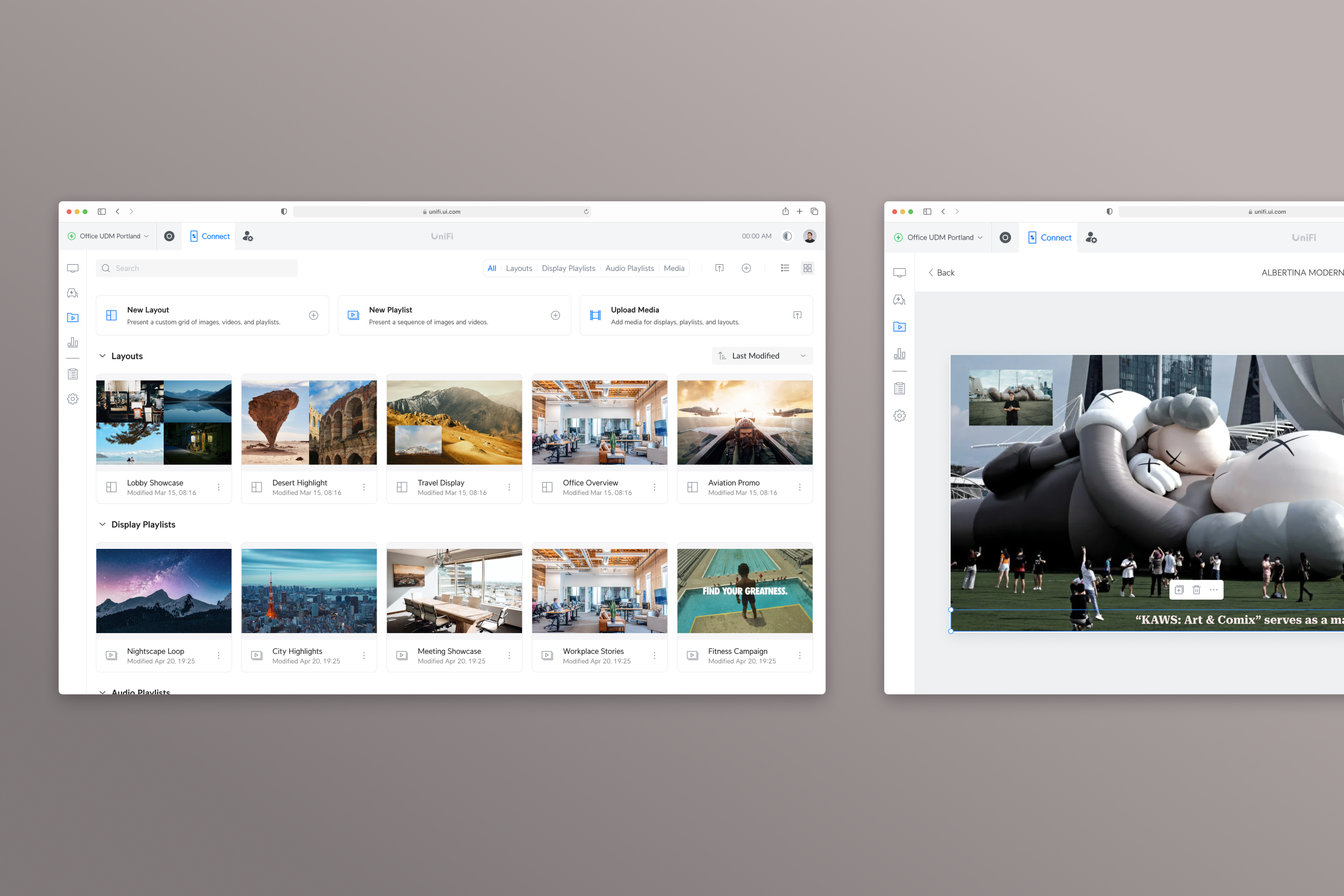
Led the design of a media content system for digital signage, enabling enterprise users to manage, create, and deliver content across a wide range of business environments.
Defined a flexible content workflow to support diverse media formats and complex display needs, introducing playlist-based sequencing and canvas-based layout composition as core interaction models.
By integrating creation tools directly into the system, the product shifted from a content management system to a complete content creation and delivery solution, enabling users to produce and deploy content more efficiently across connected displays.
My Role
- Led UX direction for the display product line, defining the overall content structure and interaction model.
- Collaborated with another designer on execution, while providing design reviews, interaction feedback, and ensuring consistency across features.
- Worked closely with PMs and engineers to align on product direction, constraints, and implementation.
Context
Ubiquiti’s display product line is designed to enable businesses to deliver and manage media content across physical business spaces such as retail stores, workplaces, and public-facing environments at scale.
Built for enterprise use, the system supports how businesses manage and assign content across connected displays, ensuring the right content is delivered to the right screens in different operational contexts.
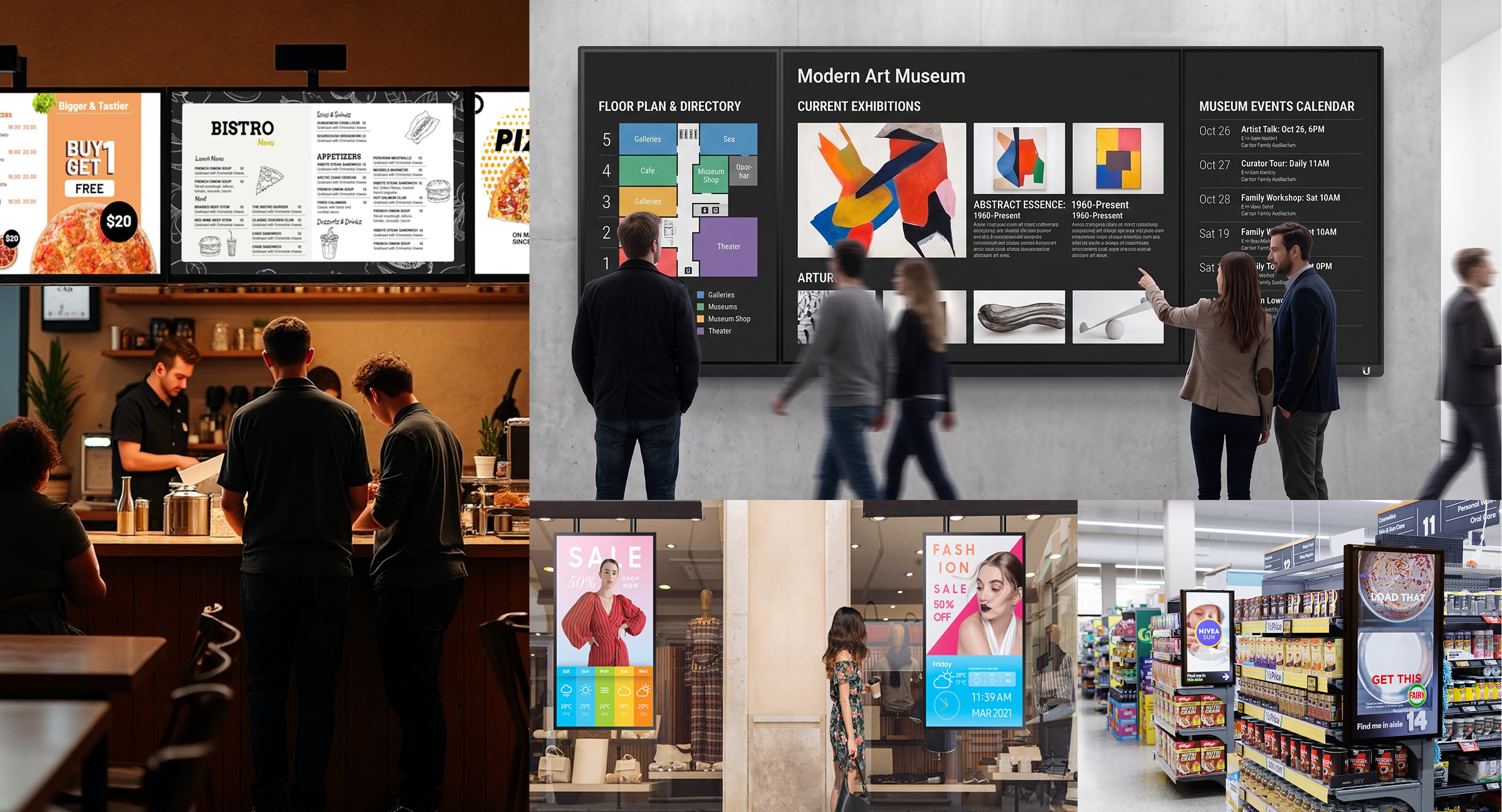
To support this, content is created and assigned through a centralized management interface, then distributed across connected displays for playback in physical spaces.
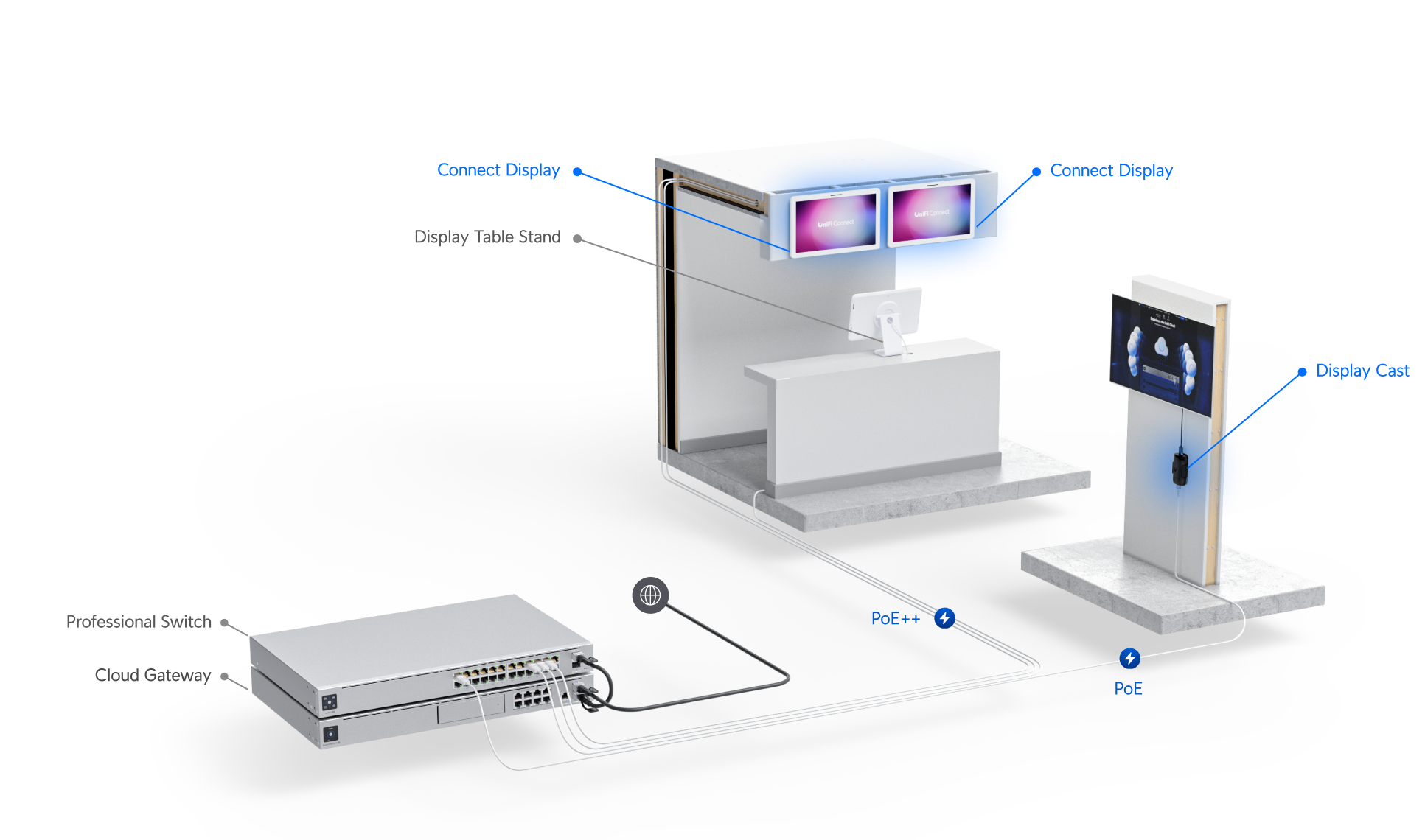
Content is delivered over the network through the console and distributed to connected displays. Connect Display presents content directly on integrated screens, while Connect Cast enables content delivery to external displays, supporting flexible deployment across different spaces.
UX Challenge
To enable enterprise users to manage and assign content across displays, the system needed to support a wide range of business needs and usage scenarios. From this, two key challenges were identified:
- Enterprise users work with a variety of content types and sources, including images, videos, websites, and externally hosted media. The challenge was not only to support these formats, but to provide a clear and scalable way to organize, identify, and manage them within a single platform.
- Display scenarios often require more than presenting a single asset, with users needing to combine multiple pieces of content within one screen. Without integrated capabilities, users must rely on external tools to create and manage these compositions, leading to fragmented workflows and reduced efficiency.
Solution Highlight - Media Library
To support the growing scale and diversity of media content, I led the design of a centralized media library to consolidate all uploaded assets into a single workspace.
When users first visit, I aimed to clearly communicate the value of the library page and help users understand how to get started with the platform.
Users upload the media they need into the library, with an uploader at the bottom right showing the upload progress and status.
Defined upload states by aligning with engineering on system behavior, and provided clear feedback and error messaging to help users understand upload outcomes.
Once users begin to build their media library, the focus shifts to how content can be efficiently organized and accessed.
I defined the information architecture and navigation system to support efficient browsing and retrieval, incorporating search, sorting, and visual cues such as thumbnails and information to help users quickly identify and reuse content across different use cases.
Consolidated all uploaded media and created content into a centralized library, providing a single place for users to manage and access assets.
Defined tailored metadata and visual cues, including icons and contextual actions, to help users quickly distinguish media types and take appropriate actions.
Introduced a list view to increase information density, allowing users to scan more items and access additional details efficiently.
Enabled direct content assignment from the media library, with support for assigning to multiple devices simultaneously.
Layout Editor
To support more complex display scenarios, I introduced a canvas-based composition approach that allows multiple types of content to be combined within a single screen.
Initial Approach
For the initial release, we focused on supporting essential content types such as images, videos, playlists, and text. These formats covered the majority of common use cases while remaining technically reliable for real-time display.
Iteration & Prioritization
As the product was adopted, additional needs emerged from both user feedback and real-world scenarios.
For example, users frequently requested elements such as clocks and weather widgets. While both served similar purposes, we prioritized the clock feature due to its lower dependency on external data sources and faster implementation.
We also identified strong demand for ticker-style text, especially in environments where longer messages needed to be displayed continuously. This aligned with common digital signage use cases, leading to its early inclusion in subsequent iterations.
Prioritized from User Feedback
At the same time, more advanced content types such as embedded websites and YouTube playback were explored. However, due to performance considerations and system reliability concerns, these features were evaluated more cautiously and deferred for further validation.
Explored with Technical Constraints
Design Outcome
The final design translates these decisions into a flexible canvas that allows users to arrange different types of content, including media assets, playlists, and dynamic elements such as text and widgets.
Core interactions such as drag, resize, and cropping were defined to support flexible layout composition while maintaining usability and consistency.
Introduced a list view to increase information density, allowing users to scan more items and access additional details efficiently.
Users can select content from the media library, including images, videos, and playlists created within the platform.
Arrange media content to create layouts for different business environments.
Defined editable properties and actions for each content item, providing clear control over how content is configured within the layout.
Defined core interactions such as drag, resize, and aspect ratio adjustment, allowing flexible arrangement of content within the canvas.
Introduced item cropping to give users more control over how media is framed, improving flexibility when arranging content.
In addition to media content, text support was included as part of the initial MVP scope. Within technical constraints, flexible editing capabilities were defined to support different usage scenarios.
Defined editing flexibility and interaction behaviors for text elements.
Based on user feedback and observations of real-world usage, additional features such as a clock widget and ticker were introduced to support more dynamic content needs.
Supportted multiple content types and widgets within each layout, enabling a high level of flexibility within technical constraints.
Ticker editing interface for configuring scrolling text content.
Defined the information hierarchy and controls within the ticker side panel, balancing visibility, usability, and flexibility based on user needs and technical feasibility.
Defined how media is displayed across different screen aspect ratios, with clear behaviors for Fill and Fit modes.
Playlist Editor
For scenarios where users need to present content in sequence, we introduced a playlist-based format, allowing them to arrange images and videos into a looped presentation.
Users can control playback order, duration, and visual behavior (such as fit or fill), providing flexibility in how content is displayed across different screens.
Provide a clear overview of all media in the playlist, along with individual settings for each item.
Support adding slides through both list and grid views, with multi-select to add multiple items at once.
Assigning Content to Displays
In addition to content management and creation, I designed a streamlined flow that enables users to quickly assign content to displays.
When users access the device side panel, the interface surfaces key device status and current playback information. If no content is assigned, a clear prompt and call to action guide users to select content from the library, including media assets, layouts, and playlists.
Once assigned, the selected content is immediately reflected, with visual previews and information providing clear visibility into what is currently displayed.
Impact
The display product line scaled to over 30K+ deployed devices, becoming the most widely adopted category within the product line.
More than 83% of users now create content directly within the platform, with a significant portion of that content actively deployed and displayed across real business environments. This shift indicates that the platform has become a primary content creation solution, reducing reliance on external tools and enabling more efficient content workflows.
Following the introduction of these capabilities, overall user activity more than doubled year-over-year, showing strong alignment with user needs.
30K+
Devices Deployed
83%
Users Creating Content Directly in the Platform
2X
Increase in User Activity (YoY)

Back to Top


© 2025 Mason Chang.
Building Ubiquiti Media Content System for Digital Signage
Built to support flexible content creation and management for enterprise users, enabling them to create, organize, and deliver media across physical business spaces.
Overview
Led the design of a media content system for digital signage, enabling enterprise users to manage, create, and deliver content across a wide range of business environments.
Defined a flexible content workflow to support diverse media formats and complex display needs, introducing playlist-based sequencing and canvas-based layout composition as core interaction models.
By integrating creation tools directly into the system, the product shifted from a content management system to a complete content creation and delivery solution, enabling users to produce and deploy content more efficiently across connected displays.
My Role
- Led UX direction for the display product line, defining the overall content structure and interaction model.
- Collaborated with another designer on execution, while providing design reviews, interaction feedback, and ensuring consistency across features.
- Worked closely with PMs and engineers to align on product direction, constraints, and implementation.
Context
Ubiquiti’s display product line is designed to enable businesses to deliver and manage media content across physical business spaces such as retail stores, workplaces, and public-facing environments at scale.
Built for enterprise use, the system supports how businesses manage and assign content across connected displays, ensuring the right content is delivered to the right screens in different operational contexts.
To support this, content is created and assigned through a centralized management interface, then distributed across connected displays for playback in physical spaces.
Content is delivered over the network through the console and distributed to connected displays. Connect Display presents content directly on integrated screens, while Connect Cast enables content delivery to external displays, supporting flexible deployment across different spaces.
UX Challenge
To enable enterprise users to manage and assign content across displays, the system needed to support a wide range of business needs and usage scenarios. From this, two key challenges were identified:
- Enterprise users work with a variety of content types and sources, including images, videos, websites, and externally hosted media. The challenge was not only to support these formats, but to provide a clear and scalable way to organize, identify, and manage them within a single platform.
- Display scenarios often require more than presenting a single asset, with users needing to combine multiple pieces of content within one screen. Without integrated capabilities, users must rely on external tools to create and manage these compositions, leading to fragmented workflows and reduced efficiency.
Solution Highlight - Media Library
To support the growing scale and diversity of media content, I led the design of a centralized media library to consolidate all uploaded assets into a single workspace.
When users first visit, I aimed to clearly communicate the value of the library page and help users understand how to get started with the platform.
Users upload the media they need into the library, with an uploader at the bottom right showing the upload progress and status.
Defined upload states by aligning with engineering on system behavior, and provided clear feedback and error messaging to help users understand upload outcomes.
Once users begin to build their media library, the focus shifts to how content can be efficiently organized and accessed.
I defined the information architecture and navigation system to support efficient browsing and retrieval, incorporating search, sorting, and visual cues such as thumbnails and information to help users quickly identify and reuse content across different use cases.
Consolidated all uploaded media and created content into a centralized library, providing a single place for users to manage and access assets.
Defined tailored metadata and visual cues, including icons and contextual actions, to help users quickly distinguish media types and take appropriate actions.
Introduced a list view to increase information density, allowing users to scan more items and access additional details efficiently.
Enabled direct content assignment from the media library, with support for assigning to multiple devices simultaneously.
Layout Editor
To support more complex display scenarios, I introduced a canvas-based composition approach that allows multiple types of content to be combined within a single screen.
Initial Approach
For the initial release, we focused on supporting essential content types such as images, videos, playlists, and text. These formats covered the majority of common use cases while remaining technically reliable for real-time display.
Iteration & Prioritization
As the product was adopted, additional needs emerged from both user feedback and real-world scenarios.
For example, users frequently requested elements such as clocks and weather widgets. While both served similar purposes, we prioritized the clock feature due to its lower dependency on external data sources and faster implementation.
We also identified strong demand for ticker-style text, especially in environments where longer messages needed to be displayed continuously. This aligned with common digital signage use cases, leading to its early inclusion in subsequent iterations.
Prioritized from User Feedback
At the same time, more advanced content types such as embedded websites and YouTube playback were explored. However, due to performance considerations and system reliability concerns, these features were evaluated more cautiously and deferred for further validation.
Explored with Technical Constraints
Design Outcome
The final design translates these decisions into a flexible canvas that allows users to arrange different types of content, including media assets, playlists, and dynamic elements such as text and widgets.
Core interactions such as drag, resize, and cropping were defined to support flexible layout composition while maintaining usability and consistency.
Introduced a list view to increase information density, allowing users to scan more items and access additional details efficiently.
Users can select content from the media library, including images, videos, and playlists created within the platform.
Arrange media content to create layouts for different business environments.
Defined editable properties and actions for each content item, providing clear control over how content is configured within the layout.
Defined core interactions such as drag, resize, and aspect ratio adjustment, allowing flexible arrangement of content within the canvas.
Introduced item cropping to give users more control over how media is framed, improving flexibility when arranging content.
In addition to media content, text support was included as part of the initial MVP scope. Within technical constraints, flexible editing capabilities were defined to support different usage scenarios.
Defined editing flexibility and interaction behaviors for text elements.
Based on user feedback and observations of real-world usage, additional features such as a clock widget and ticker were introduced to support more dynamic content needs.
Supportted multiple content types and widgets within each layout, enabling a high level of flexibility within technical constraints.
Ticker editing interface for configuring scrolling text content.
Defined the information hierarchy and controls within the ticker side panel, balancing visibility, usability, and flexibility based on user needs and technical feasibility.
Defined how media is displayed across different screen aspect ratios, with clear behaviors for Fill and Fit modes.
Playlist Editor
For scenarios where users need to present content in sequence, we introduced a playlist-based format, allowing them to arrange images and videos into a looped presentation.
Users can control playback order, duration, and visual behavior (such as fit or fill), providing flexibility in how content is displayed across different screens.
Provide a clear overview of all media in the playlist, along with individual settings for each item.
Support adding slides through both list and grid views, with multi-select to add multiple items at once.
Assigning Content to Displays
In addition to content management and creation, I designed a streamlined flow that enables users to quickly assign content to displays.
When users access the device side panel, the interface surfaces key device status and current playback information. If no content is assigned, a clear prompt and call to action guide users to select content from the library, including media assets, layouts, and playlists.
Once assigned, the selected content is immediately reflected, with visual previews and information providing clear visibility into what is currently displayed.
Impact
The display product line scaled to over 30K+ deployed devices, becoming the most widely adopted category within the product line.
More than 83% of users now create content directly within the platform, with a significant portion of that content actively deployed and displayed across real business environments. This shift indicates that the platform has become a primary content creation solution, reducing reliance on external tools and enabling more efficient content workflows.
Following the introduction of these capabilities, overall user activity more than doubled year-over-year, showing strong alignment with user needs.
30K+
Devices Deployed
83%
Users Creating Content Directly in the Platform
2X
Increase in User Activity (YoY)

Back to Top
© 2026 Mason Chang. All Rights Reserved.
Building Ubiquiti Media Content System for Digital Signage
Built to support flexible content creation and management for enterprise users, enabling them to create, organize, and deliver media across physical business spaces.
Overview
Led the design of a media content system for digital signage, enabling enterprise users to manage, create, and deliver content across a wide range of business environments.
Defined a flexible content workflow to support diverse media formats and complex display needs, introducing playlist-based sequencing and canvas-based layout composition as core interaction models.
By integrating creation tools directly into the system, the product shifted from a content management system to a complete content creation and delivery solution, enabling users to produce and deploy content more efficiently across connected displays.
My Role
- Led UX direction for the display product line, defining the overall content structure and interaction model.
- Collaborated with another designer on execution, while providing design reviews, interaction feedback, and ensuring consistency across features.
- Worked closely with PMs and engineers to align on product direction, constraints, and implementation.
Context
Ubiquiti’s display product line is designed to enable businesses to deliver and manage media content across physical business spaces such as retail stores, workplaces, and public-facing environments at scale.
Built for enterprise use, the system supports how businesses manage and assign content across connected displays, ensuring the right content is delivered to the right screens in different operational contexts.
To support this, content is created and assigned through a centralized management interface, then distributed across connected displays for playback in physical spaces.
Content is delivered over the network through the console and distributed to connected displays. Connect Display presents content directly on integrated screens, while Connect Cast enables content delivery to external displays, supporting flexible deployment across different spaces.
UX Challenge
To enable enterprise users to manage and assign content across displays, the system needed to support a wide range of business needs and usage scenarios. From this, two key challenges were identified:
- Enterprise users work with a variety of content types and sources, including images, videos, websites, and externally hosted media. The challenge was not only to support these formats, but to provide a clear and scalable way to organize, identify, and manage them within a single platform.
- Display scenarios often require more than presenting a single asset, with users needing to combine multiple pieces of content within one screen. Without integrated capabilities, users must rely on external tools to create and manage these compositions, leading to fragmented workflows and reduced efficiency.
Solution Highlight - Media Library
To support the growing scale and diversity of media content, I led the design of a centralized media library to consolidate all uploaded assets into a single workspace.
When users first visit, I aimed to clearly communicate the value of the library page and help users understand how to get started with the platform.
Users upload the media they need into the library, with an uploader at the bottom right showing the upload progress and status.
Defined upload states by aligning with engineering on system behavior, and provided clear feedback and error messaging to help users understand upload outcomes.
Once users begin to build their media library, the focus shifts to how content can be efficiently organized and accessed.
I defined the information architecture and navigation system to support efficient browsing and retrieval, incorporating search, sorting, and visual cues such as thumbnails and information to help users quickly identify and reuse content across different use cases.
Consolidated all uploaded media and created content into a centralized library, providing a single place for users to manage and access assets.
Defined tailored metadata and visual cues, including icons and contextual actions, to help users quickly distinguish media types and take appropriate actions.
Introduced a list view to increase information density, allowing users to scan more items and access additional details efficiently.
Enabled direct content assignment from the media library, with support for assigning to multiple devices simultaneously.
Layout Editor
To support more complex display scenarios, I introduced a canvas-based composition approach that allows multiple types of content to be combined within a single screen.
Initial Approach
For the initial release, we focused on supporting essential content types such as images, videos, playlists, and text. These formats covered the majority of common use cases while remaining technically reliable for real-time display.
Iteration & Prioritization
As the product was adopted, additional needs emerged from both user feedback and real-world scenarios.
For example, users frequently requested elements such as clocks and weather widgets. While both served similar purposes, we prioritized the clock feature due to its lower dependency on external data sources and faster implementation.
We also identified strong demand for ticker-style text, especially in environments where longer messages needed to be displayed continuously. This aligned with common digital signage use cases, leading to its early inclusion in subsequent iterations.
Prioritized from User Feedback
At the same time, more advanced content types such as embedded websites and YouTube playback were explored. However, due to performance considerations and system reliability concerns, these features were evaluated more cautiously and deferred for further validation.
Explored with Technical Constraints
Design Outcome
The final design translates these decisions into a flexible canvas that allows users to arrange different types of content, including media assets, playlists, and dynamic elements such as text and widgets.
Core interactions such as drag, resize, and cropping were defined to support flexible layout composition while maintaining usability and consistency.
Introduced a list view to increase information density, allowing users to scan more items and access additional details efficiently.
Users can select content from the media library, including images, videos, and playlists created within the platform.
Arrange media content to create layouts for different business environments.
Defined editable properties and actions for each content item, providing clear control over how content is configured within the layout.
Defined core interactions such as drag, resize, and aspect ratio adjustment, allowing flexible arrangement of content within the canvas.
Introduced item cropping to give users more control over how media is framed, improving flexibility when arranging content.
In addition to media content, text support was included as part of the initial MVP scope. Within technical constraints, flexible editing capabilities were defined to support different usage scenarios.
Defined editing flexibility and interaction behaviors for text elements.
Based on user feedback and observations of real-world usage, additional features such as a clock widget and ticker were introduced to support more dynamic content needs.
Designed the layout to support multiple content types and widgets within a single screen, balancing flexibility with technical constraints.
Ticker editing interface for configuring scrolling text content.
Defined the information hierarchy and controls within the ticker side panel, balancing visibility, usability, and flexibility based on user needs and technical feasibility.
Defined how media is displayed across different screen aspect ratios, with clear behaviors for Fill and Fit modes.
Playlist Editor
For scenarios where users need to present content in sequence, we introduced a playlist-based format, allowing them to arrange images and videos into a looped presentation.
Users can control playback order, duration, and visual behavior (such as fit or fill), providing flexibility in how content is displayed across different screens.
Provide a clear overview of all media in the playlist, along with individual settings for each item.
Support adding slides through both list and grid views, with multi-select to add multiple items at once.
Assigning Content to Displays
In addition to content management and creation, I designed a streamlined flow that enables users to quickly assign content to displays.
When users access the device side panel, the interface surfaces key device status and current playback information. If no content is assigned, a clear prompt and call to action guide users to select content from the library, including media assets, layouts, and playlists.
Once assigned, the selected content is immediately reflected, with visual previews and information providing clear visibility into what is currently displayed.
Impact
The display product line scaled to over 30K+ deployed devices, becoming the most widely adopted category within the product line.
More than 83% of users now create content directly within the platform, with a significant portion of that content actively deployed and displayed across real business environments. This shift indicates that the platform has become a primary content creation solution, reducing reliance on external tools and enabling more efficient content workflows.
Following the introduction of these capabilities, overall user activity more than doubled year-over-year, showing strong alignment with user needs.
30K+
Devices Deployed
83%
Users Creating Content Directly in the Platform
2X
Increase in User Activity (YoY)

Back to Top

© 2026 Mason Chang. All Rights Reserved.